Flared Kurta, Greeting Cards, Back To School, Verbal Reasoning
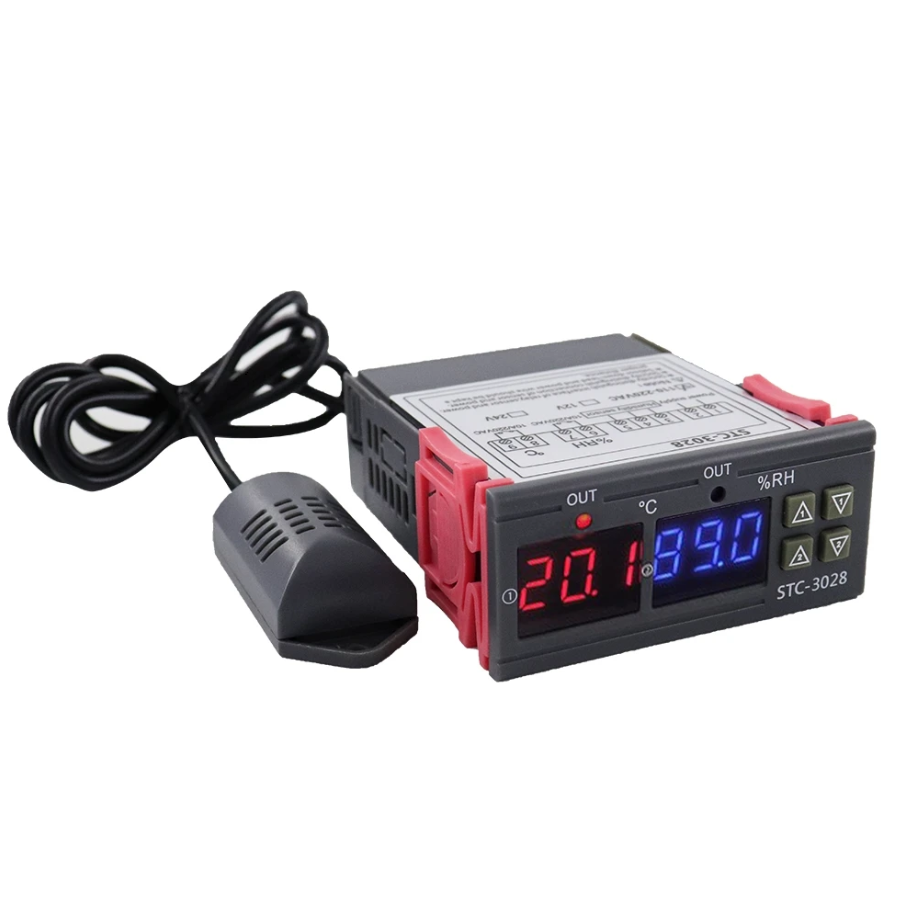
Digital Thermostat STC3028 Temperature & humidity
$ 19.51
Integrated Sensor: Measures temperature and humidity. Heating: Heating starts when the start temperature is lower than the stop temperature. Cooling: Cooling starts when the start temperature is higher than the stop temperature. Humidification: Humidification starts when the start humidity is lower than the stop humidity. Dehumidification: Dehumidification starts when the start humidity is higher than the stop humidity. Setting Instructions: Setting the Start Temperature: Long press the UP 1 button for 3 seconds until the display starts flashing (①).Adjust the start temperature by pressing the UP or DOWN button (default 20°C).Setting the Stop Temperature: Long press the DOWN 1 button for 3 seconds until the display starts flashing (①).Adjust the stop temperature by pressing the UP or DOWN button (default 30°C).Setting the Start Humidity: Long press the UP 2 button for 3 seconds until the display starts flashing (②).Adjust the start humidity by pressing the UP or DOWN button (default 40% RH).Setting the Stop Humidity: Long press the DOWN 2 button for 3 seconds until the display starts flashing (②).Adjust the stop humidity by pressing the UP or DOWN button (default 60% RH).Resetting the Controller: Long press the DOWN 1 and DOWN 2 buttons simultaneously for 3 seconds.Calibrating the Temperature: Long press the UP 1 and DOWN 1 buttons simultaneously. Adjust the temperature between -10 and 10°C.Calibrating the Humidity: Long press the UP 2 and DOWN 2 buttons simultaneously. Adjust the humidity. With these instructions, you can easily set and calibrate the STC-3028 thermostat to ensure optimal environmental control.